 Tripperz
The same route on every phone
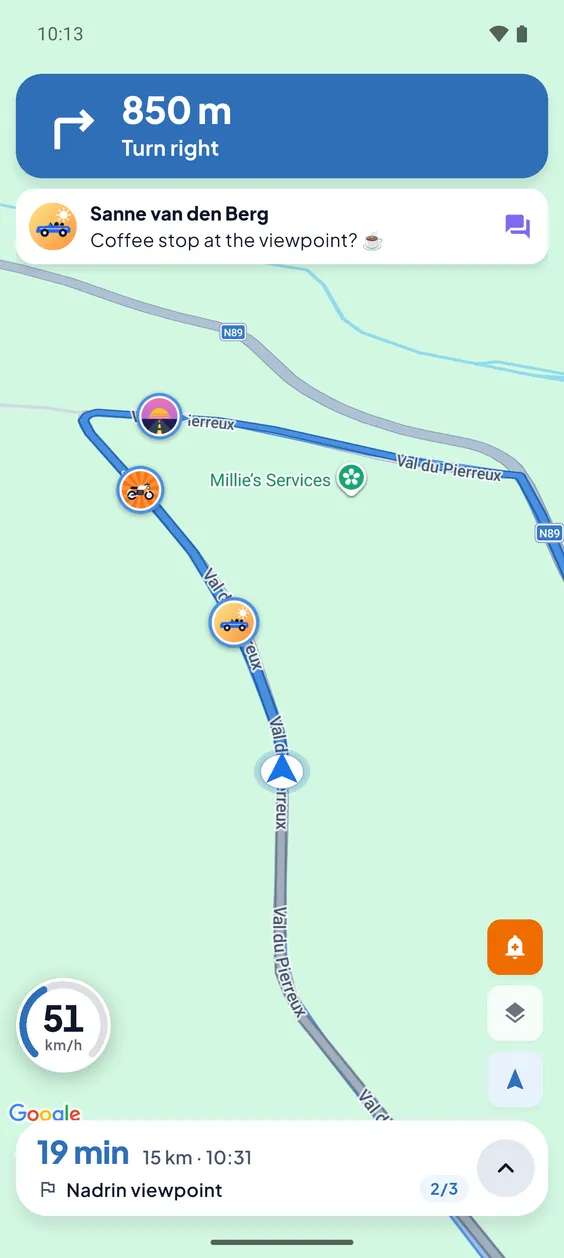
Every driver gets turn-by-turn directions for the route of the group, with the speed limit and traffic on the way.
Driving together
Two cars to a holiday home, five bikes on a Sunday ride, the whole family on the way to a wedding. Tripperz gives everyone the same route and puts the whole group on one live map, so you arrive together.
The plan is always the same: stay together. In practice one traffic light, a missed exit or a fuel stop is enough to split the group. Then the calling and texting starts, usually by the people who are driving.
Following the car in front does not work either. You watch a bumper instead of the road, and as soon as another car cuts in you are guessing again.
In Tripperz you make one ride for the whole group. Everyone who joins gets the same route with turn-by-turn directions on their own phone, and sees the others driving on the map. Did someone fall behind? You see where they are and that they are still on the route, so nobody has to speed up or pull over to call.
Why Tripperz
Everything a group needs to leave together and arrive together.
Every driver gets turn-by-turn directions for the route of the group, with the speed limit and traffic on the way.
Every car or bike is on the map while you drive. You see who is ahead, who is behind and who left the route.
One person is the road captain and leads the ride. The rest follows the same route in the app.
Driving in from different places? Tripperz plans where you meet before you drive one route together.
Pick a fuel or food stop further along the route. The group votes and the stop is added for everyone.
With Android Auto you follow the group route on the screen of your car, with the others and the next turn in view.
How it works
Set up before the first car leaves the driveway.
Choose the destination and the route. Add stops if you want them.
Share the link or QR code. Whoever opens it sees the ride and joins with one tap.
Everyone navigates the same route and sees the group live on the map.
The ride is saved to your drive history with the route and the distance.
FAQ
Tripperz is made for exactly that. You create one ride, invite the other drivers with a link or QR code, and everyone gets the same route on their own phone. During the ride you see each other live on one map.
A ride with friends has room for 4 participants. For larger groups there are organization plans: up to 20 participants per ride on Club, 50 on Business and 100 on Enterprise.
They keep the group route on their phone and stay visible on the map. The others can see where they are and whether they are back on the route, so nobody has to call while driving.
No. When drivers start from different places, Tripperz plans a meeting point where you come together. From there you drive one route.
Every driver who wants to navigate with the group and be visible on the map installs Tripperz and joins the ride with the invite link or QR code. Tripperz is available as an Android beta; the iOS version is in development.
Yes. Group rides, live location sharing and navigation are part of the Free plan, and you do not need a card. Premium and Pro keep more route history. Clubs and organizers can take an organization plan with a 14-day trial.
Get started
Download Tripperz on mobile for trips and live tracking. Manage subscriptions and organizations from the web dashboard.
iOS version in development.
Questions? info@basbakens.nl