 Tripperz
Straight to the map
Open Tripperz in the car and the map around you is there, with Where to, Trips and Map.
Android Auto
Tripperz works in Android Auto. Choose a destination, pick the fastest, eco or scenic route and follow every turn on the screen of your car. Join your group's trip from the car, without touching your phone.
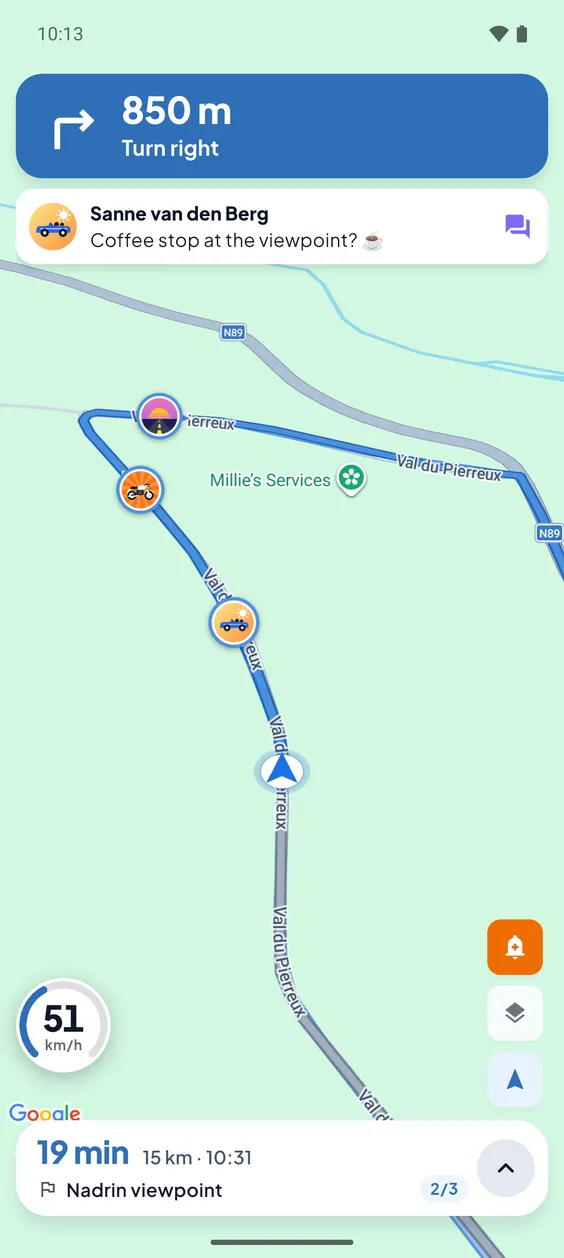
A phone in a holder works, but the screen of your car is bigger, in the right place and made for driving. With Android Auto, Tripperz runs on that screen with only what you need on the road.
You see the map around you right away, with Where to, Trips and Map. Pick a saved place or search an address; results show up while you type. Then choose Fastest, Eco or Scenic, just like on your phone. You can avoid toll roads, ferries and motorways from the car too.
Every turn shows the street name, your arrival time and the distance, on a map in light, dark or automatic mode. Start your own trip or join one that is already under way. The app on your phone does not need to be open.
Why Tripperz
Built for the screen in your dashboard.
Open Tripperz in the car and the map around you is there, with Where to, Trips and Map.
Fastest, Eco or Scenic, with all routes on the map and the roads to avoid.
Street name, arrival time and distance for each turn.
Start your own trip or join your group's trip that is already under way.
The map follows the light, or you choose light or dark yourself.
The app on your phone does not need to be open while you drive.
How it works
Tripperz is not in the Play Store yet, so Android Auto needs one setting once.
Download the Tripperz Android beta from this website.
In the Android Auto settings, tap the version number 10 times, open the menu at the top right, choose Developer settings and turn on Unknown sources.
Connect to your car with a cable or wirelessly, as you always do.
Tap the Tripperz icon on the car screen and choose where you want to go.
FAQ
Yes. Since version 0.7.4 you can navigate with Tripperz on the screen of your car: choose a destination, pick a route, follow the turns and start or join trips.
Android Auto only shows apps from the Play Store by default. Tripperz is not in the Play Store yet, so you allow it once: tap the version number 10 times in the Android Auto settings, open Developer settings and turn on Unknown sources.
Yes. Start your own trip or join one that is already under way, directly from the car screen.
Not yet. A version for CarPlay is in the works.
Yes. Android Auto is part of the Free plan.
Get started
Download Tripperz on mobile for trips and live tracking. Manage subscriptions and organizations from the web dashboard.
iPhone? The iOS app is in a private beta through TestFlight. Request an invite
Questions? info@basbakens.nl