 Tripperz
Load any GPX file
From a route planner, a club, a website or a friend. Pick the file and Tripperz makes a trip of it.
GPX routes
Planned a route in another app or downloaded one from a website? Load the GPX file into Tripperz. You navigate it turn by turn, and everyone you invite drives exactly the same route.
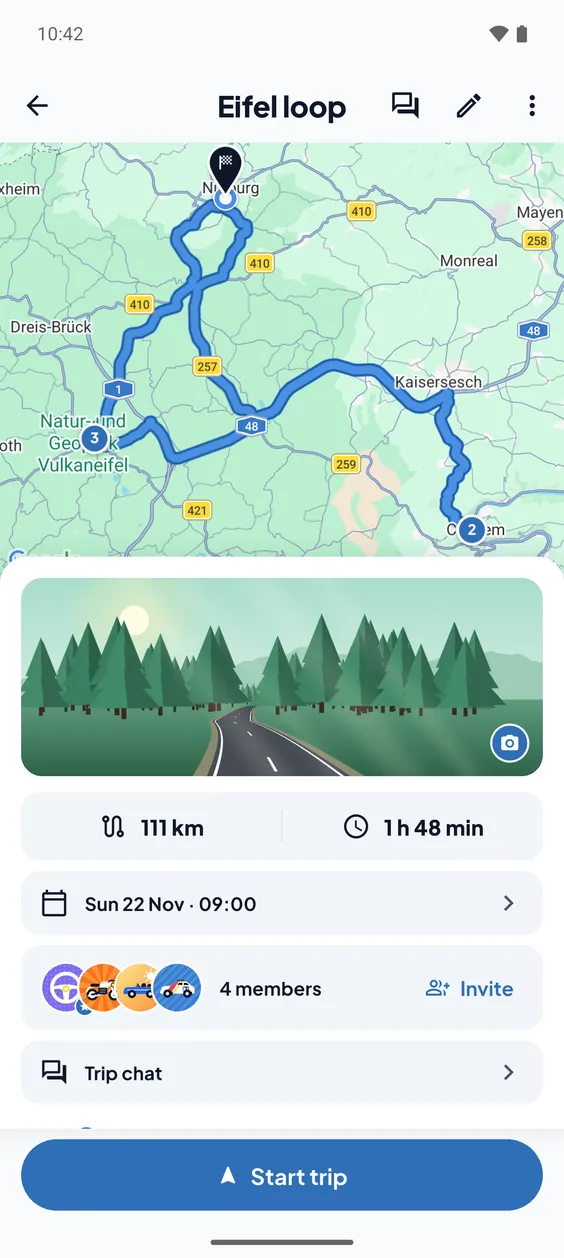
Many riders plan their routes on a computer, or download them from a club, a magazine or a route website. Those routes usually come as a GPX file. The question is how to drive it, and how to make sure the rest of the group drives the same thing.
Under Trips, New trip, choose Import route and pick the GPX file. Tripperz turns it into a trip with the line from the file and stops named after the towns along the way, picked so the ride follows the line as closely as it can.
From there it is a normal Tripperz trip: navigate it with spoken turns, add a fuel stop, or invite the group. Everyone who joins gets the same route on their own phone.
Why Tripperz
Your route, with everything Tripperz adds.
From a route planner, a club, a website or a friend. Pick the file and Tripperz makes a trip of it.
The stops are placed so the ride follows the line in the file as closely as it can.
Navigate the route with spoken turns, the speed limit and traffic on the way.
Invite the others with a link. Everyone drives the GPX route and sees the group live on the map.
Need fuel or food? Pick a stop further along the route and it is added for everyone.
Share the route as a link that opens on tripperz.eu, or publish it under Explore.
How it works
From file to navigation in four steps.
Export it from your route planner or download it from a website.
In Tripperz, go to Trips, New trip and choose Import route.
Share the invite link or QR code if you are not riding alone.
Start the navigation. Everyone follows the same route.
FAQ
GPX is a common file format for routes and tracks. Route planners, sports apps and route websites use it to save a route, so you can open it in another app.
Go to Trips, tap New trip and choose Import route. Pick the GPX file on your phone. Tripperz turns it into a trip that you can navigate and share with your group.
Any app or website that saves a route as a GPX file, such as most route planners for motorcycles and cars, and sports apps. You can also use a file you got by email or chat.
No. One person imports the file and invites the others to the trip. Everyone who joins gets the same route in their own app.
Importing routes is part of Premium and Pro, and of every organization plan. Premium starts at €1.99 per week, and with a yearly plan you try it free for 7 days first.
Tripperz is available as an Android beta that you download from this website. The iPhone app is in a private beta through TestFlight; email us for an invite.
Get started
Download Tripperz on mobile for trips and live tracking. Manage subscriptions and organizations from the web dashboard.
iPhone? The iOS app is in a private beta through TestFlight. Request an invite
Questions? info@basbakens.nl