 Tripperz
Fixed cameras
Fixed speed cameras on your route, shown on the map and announced before you get there.
Speed camera alerts
Fixed speed cameras, average speed checks and reports from other drivers, right in the navigation you are already using. Free for everyone in the Netherlands and Belgium, with no separate app and no subscription.
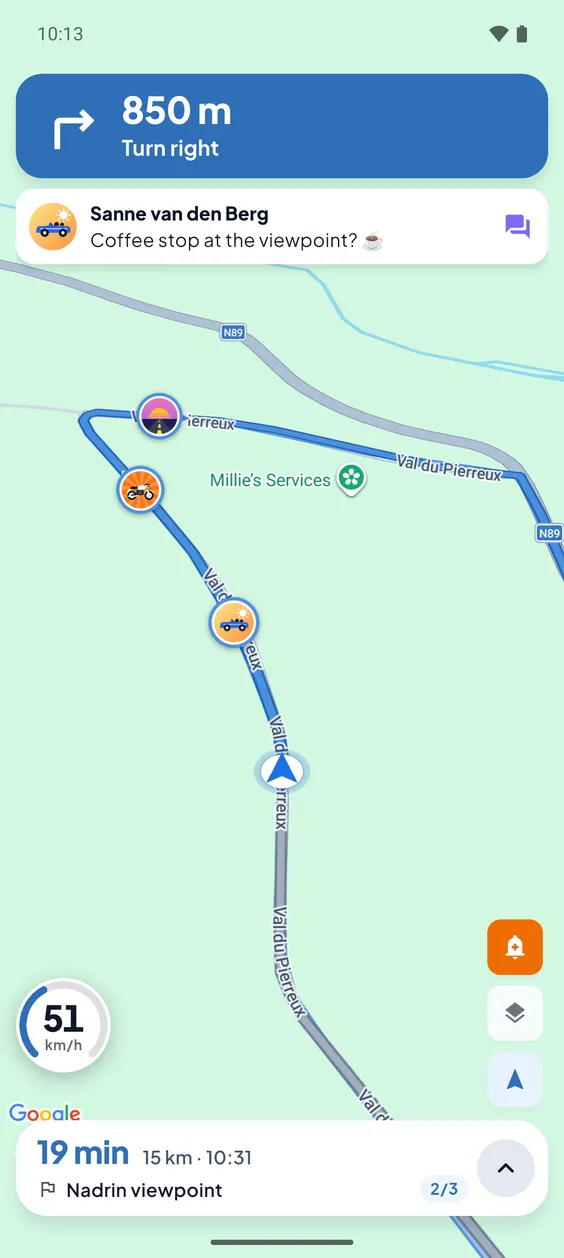
Many drivers run a navigation app and a speed camera app at the same time. Two apps that talk over each other, and one more screen to check. Tripperz puts the warnings in the navigation itself: on the map, next to the speed limit, and spoken once when you get close.
You see fixed speed cameras and average speed check sections, and what other drivers report: mobile speed checks, accidents, traffic jams, road works and closed roads.
In the Netherlands and Belgium you may use speed camera warnings. In Germany, Switzerland, France and several other countries drivers are not allowed to. Tripperz knows where you are and stays quiet outside the Netherlands and Belgium, so you do not have to remember to switch anything off at the border.
Why Tripperz
Free for everyone, on every ride.
Fixed speed cameras on your route, shown on the map and announced before you get there.
Sections with average speed control on your route are shown too.
Mobile speed checks, accidents, traffic jams and closed roads that other drivers report.
The speed limit of the road is always in view while you navigate.
Each warning is spoken once per ride, so the app does not keep talking.
Outside the Netherlands and Belgium the warnings stop by themselves.
How it works
They are on by default.
Install the Android beta from this website. The Free plan is enough.
Choose a destination and a route, or join a ride.
Cameras and reports on your route appear on the map and are spoken once.
Saw a mobile speed check or an accident? Report it and earn XP.
FAQ
Yes. Speed camera and road alerts are free for everyone, on the Free plan too. There is no separate speed camera subscription.
In the Netherlands and Belgium you may use speed camera warnings. In Germany, Switzerland, France and several other countries drivers are not allowed to use them. Tripperz only shows the warnings in the Netherlands and Belgium.
Yes. Tripperz shows fixed speed cameras and sections with average speed control while you navigate.
Other Tripperz drivers report them while they drive, together with accidents, traffic jams and closed roads. You can report them yourself too.
Yes. With the speaker button on the map you choose: everything on, only alerts, or off.
Tripperz is available as an Android beta that you download from this website. The iPhone app is in a private beta through TestFlight; email us for an invite.
Get started
Download Tripperz on mobile for trips and live tracking. Manage subscriptions and organizations from the web dashboard.
iPhone? The iOS app is in a private beta through TestFlight. Request an invite
Questions? info@basbakens.nl