 Tripperz
Price per litre
The price at every station along the rest of your route.
Fuel prices
Tripperz shows the fuel stations further along your route with the price per litre, how far you drive out of your way and what you save. Pick the best deal and it is added to your route.
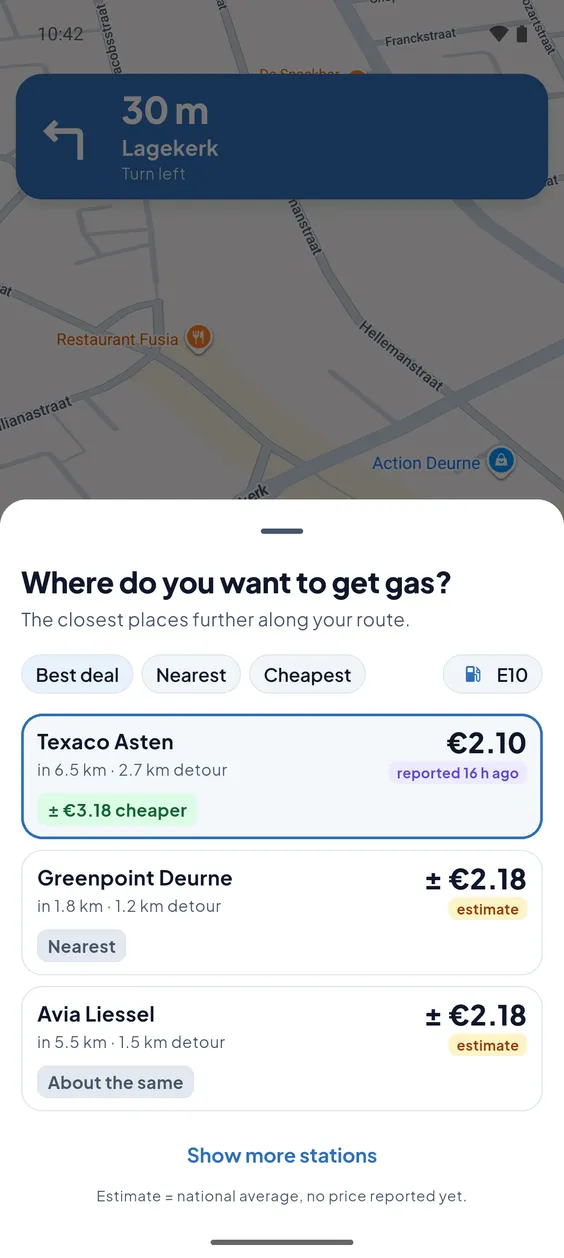
A station that is 10 cents cheaper is no deal when you drive 15 minutes out of your way. And the station right next to the motorway is often the most expensive one. What you want to know is simple: where along my route do I fill up best?
Tripperz looks at the stations further along your route. For each one you see the price per litre, how far you drive out of your way and what you save compared to the others. Sort by best deal, closest or cheapest, and tap one to add it as a stop.
Riding with a group? Choose a fuel stop together. The group votes and the stop is added for everyone. Tripperz also reminds you to fill up in time.
Why Tripperz
Fill up cheaper without searching.
The price at every station along the rest of your route.
See how far each station takes you out of your way.
Compare the stations and see what the cheaper choice saves you.
Tap a station and it becomes a stop. The route is recalculated.
In a ride the group votes on the stop, and it is added for everyone.
Tripperz counts the kilometres since your last fill-up and reminds you in time.
How it works
Without leaving the navigation.
Start a ride or drive to a destination.
See the stations further along your route.
Sort by best deal, closest or cheapest and pick a station.
The station is added as a stop and the navigation continues.
FAQ
In Tripperz, open Fuel while you navigate. You see the stations further along your route with the price per litre, the detour and the saving. Pick one and it is added as a stop.
Where there is an official price source, the price comes from there. Otherwise Tripperz uses the price another driver reported recently, and if there is none, an estimate based on the national average price.
You set your own fuel under My fuel, for example petrol, diesel or LPG, and the prices and savings are shown for that fuel.
Yes. Report the price at a station and other drivers see it. You earn XP for it too.
Yes. Fuel prices along your route are part of the Free plan.
Tripperz is available as an Android beta that you download from this website. The iPhone app is in a private beta through TestFlight; email us for an invite.
Get started
Download Tripperz on mobile for trips and live tracking. Manage subscriptions and organizations from the web dashboard.
iPhone? The iOS app is in a private beta through TestFlight. Request an invite
Questions? info@basbakens.nl